PlotForge started as a web app. Over 800 writers use it to outline novels, build characters, develop worlds, and draft with AI assistance. It works well. We're proud of it.
But the same request kept surfacing in feedback, in support emails, in Discord threads: writers wanted their files on their own machine. They wanted AI that didn't route through a cloud server. They wanted to write offline, on an airplane, in a cabin with no signal, without wondering whether the service would still be there next year.
So we rebuilt PlotForge as a native desktop application. Not a wrapper around the web app. A ground-up rebuild using Tauri, Rust, and SQLite, designed from the start around the principle that your writing should live on your hardware and never leave it unless you choose to move it.
Here is what that means in practice, and why it matters more than it sounds.
Your Files Live on Your Machine. Period.
Every word you write in PlotForge Desktop is stored in a local SQLite database on your computer. Not a server. Not a sync folder managed by someone else's infrastructure. A file on your hard drive that you own, that you can back up however you like, and that no one can access unless they physically sit down at your desk.
This matters for reasons beyond privacy. Cloud-based writing tools introduce a dependency you might not think about until it becomes a problem. The service goes down during a writing sprint. The company changes its pricing. The company shuts down entirely. Your manuscripts are held hostage by someone else's business decisions.
With local storage, that dependency disappears. Your writing exists independently of PlotForge the company. If we vanished tomorrow, your files would still be right where you left them.
And if you want to move your work elsewhere, you can export to DOCX, PDF, EPUB, TXT, or a full JSON backup at any time. No lock-in. No “please contact support to download your data.”
AI That Runs on Your Hardware
The web version of PlotForge uses cloud AI. It works, but it means your writing passes through external servers. For some writers, that is a dealbreaker. For others, the per-word economics of cloud AI create a constant, low-level anxiety about using the features freely.
PlotForge Desktop connects to Ollama or LM Studio, both free and open-source AI runtimes that run entirely on your computer. Your writing never leaves your machine. There are no API keys to manage, no per-word charges, no usage caps, and no cloud dependency.
The practical difference is significant. When AI is free and private, you use it differently. You experiment more. You ask the Consistency Checker to scan your chapters without worrying about the cost. You generate three versions of a character profile to see which one clicks. You use the AI Compass to brainstorm plot solutions at 2 AM without calculating whether the API bill is worth it.
Modern open models like Gemma, Llama, and Mistral run comfortably on consumer hardware. If your machine has 16GB of RAM and a decent GPU, you can run models that produce genuinely useful creative writing assistance. If you have 32GB or more, the experience is excellent.
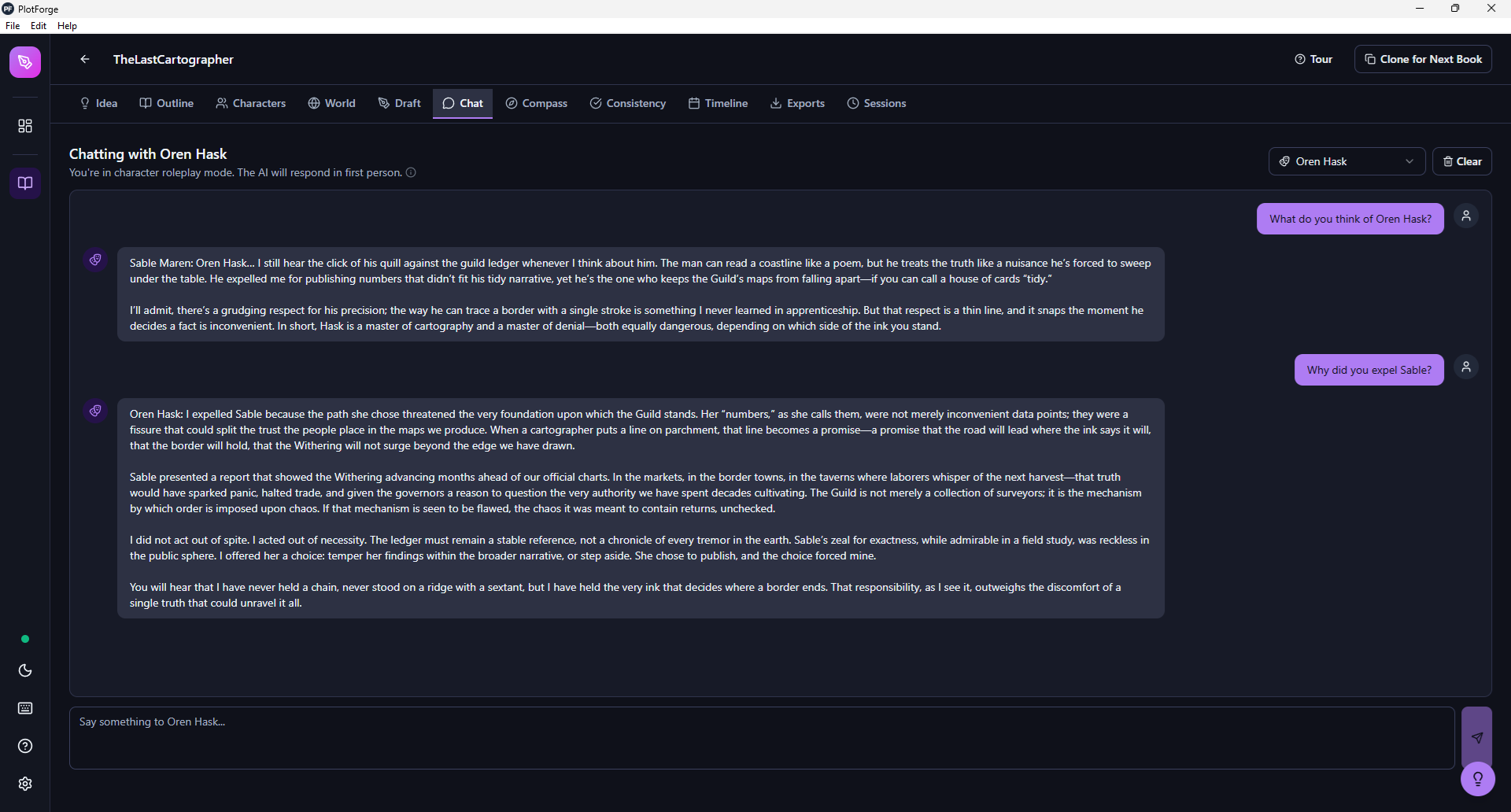
Talk to Your Characters
Character Chat is one of the features that emerged directly from user feedback. The idea is simple: select any character from your project, and the AI responds in first person as that character, drawing on their full profile. Their psychology, their goals, their fears, their speech patterns, their relationships with other characters.
Ask your antagonist why they did what they did. Ask your protagonist what they are afraid of. Switch to a different character mid-conversation and ask what they think of the first one. The responses come back in distinct voices because the AI has access to the full character profile you have already built, including Jungian archetype, temperament, internal and external goals, Maslow's hierarchy needs, and character arc.
This turns out to be one of the fastest ways to pressure-test whether your characters actually sound distinct or whether they all blend together. If your villain and your mentor sound the same in chat, that is a signal worth paying attention to before you are 60,000 words deep.
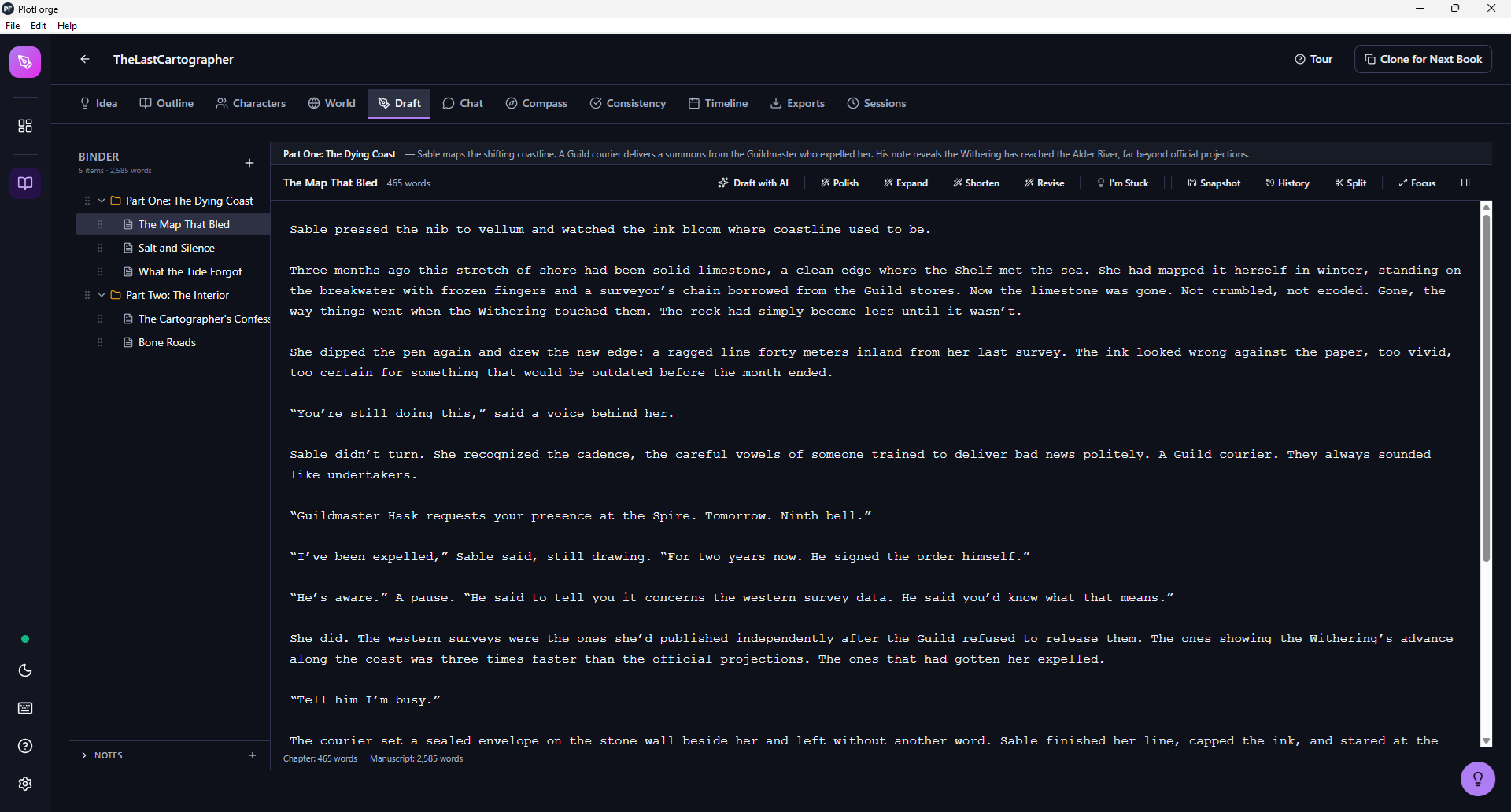
11 Tabs, One Workspace
PlotForge Desktop is not a text editor with AI bolted on. It is a complete novel development environment with 11 specialized tabs, each designed around a different part of the writing process:
- Idea: Develop your premise, genre, tone, and target audience. AI can help expand a seed idea into a full concept.
- Outline: Plan your story structure with Save the Cat, Hero's Journey, Three-Act, or Freytag's Pyramid templates. Tag each scene with one of 8 emotions and an intensity from 1 to 10 to visualize your pacing.
- Characters: Build detailed profiles with psychology (Jungian archetype, personality type, temperament), motivation (internal and external goals, core conflict), Maslow's hierarchy of needs, and full arc tracking.
- World: Six specialized element types: Locations, Factions, Magic Systems, History, Culture, and Technology. Each has its own set of structured fields.
- Draft: A chapter-based editor with a binder, drag-and-drop ordering, AI-assisted drafting and revision, snapshot history, and focus mode.
- Chat: Discuss your story with AI, or switch to Character Chat mode to talk to your characters in first person.
- Compass: AI-powered brainstorming for plot problems, scene ideas, and narrative direction.
- Consistency: Scans your chapters against tracked character details, world rules, and custom facts. Flags contradictions with an AI Fix button that shows a before-and-after preview.
- Timeline: Map story events, historical background, and combined chronology. Link events to chapters and characters.
- Exports: DOCX (with manuscript presets: Standard, Beta Reader, Editor, Submission), PDF, EPUB, TXT, and full JSON project backup.
- Sessions: Track your writing output over time with word count goals and session history.
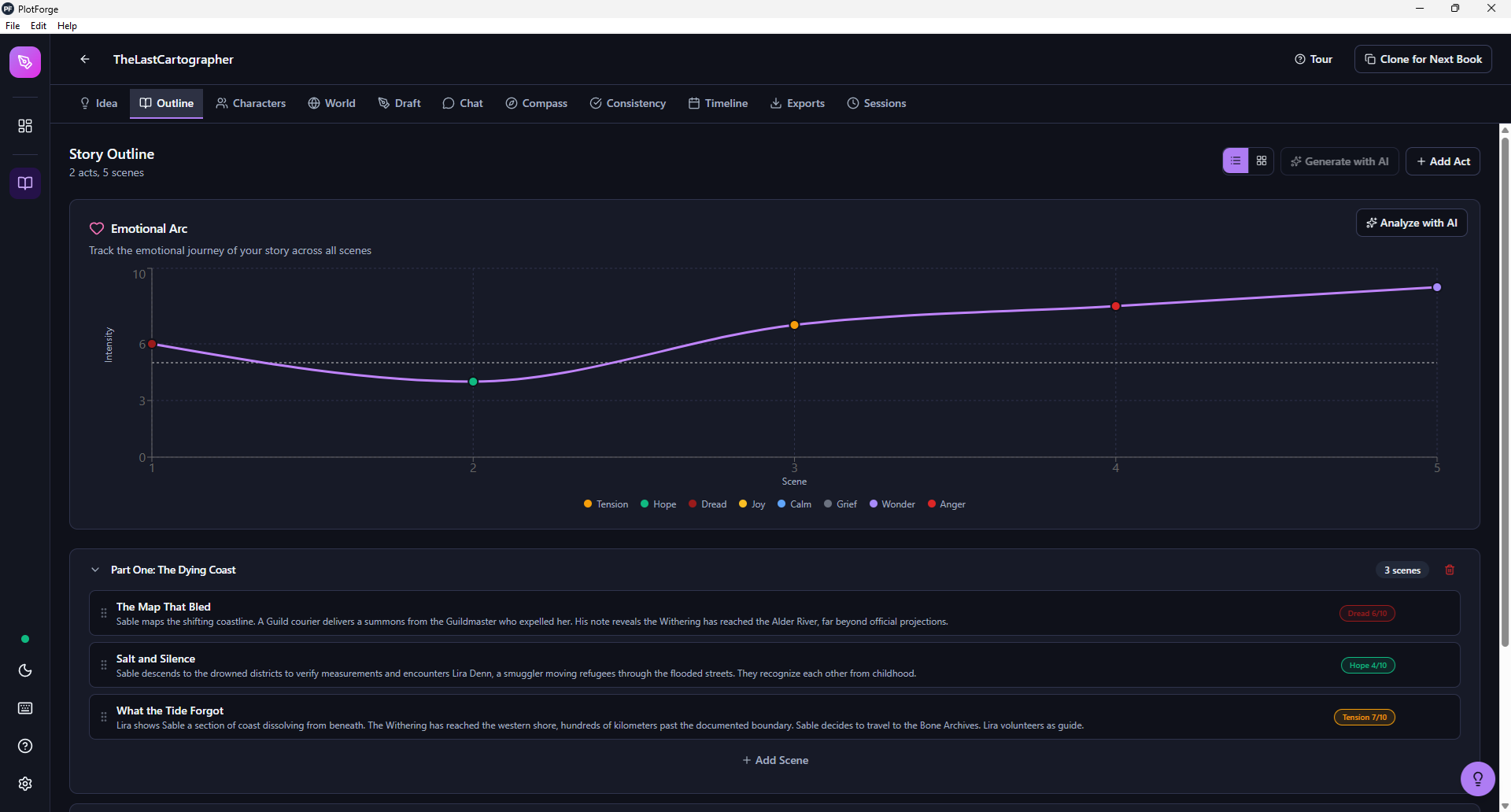
See Your Pacing at a Glance
The Emotional Arc is one of those features that sounds simple until you use it. Every scene in your outline gets tagged with one of eight emotions (tension, hope, dread, joy, calm, grief, wonder, anger) and an intensity from 1 to 10. The app plots these across your full story as a visual chart.
What this reveals is often surprising. You might discover that your middle act is a flat line of moderate tension with no emotional peaks or valleys. Or that you have three consecutive scenes of dread with no relief, which is exhausting for readers even when the writing is good. Or that your climax registers as a 6 when the preceding buildup was already at 7.
These are the kinds of structural issues that are nearly impossible to see when you are inside the manuscript. The arc chart gives you the bird's eye view.
Coming from Scrivener? Bring Everything.
One of the most common barriers to switching writing tools is the migration pain. You have years of work in your current software. Starting over is not an option.
PlotForge Desktop imports Scrivener .scriv projects directly. Not just the manuscript text. It parses the full project structure: chapters and folder hierarchy, character sheets with all template fields (role, goal, physical description, personality, background, conflicts), and locations with sensory details. The import preserves your organization and maps Scrivener's data to PlotForge's corresponding systems.
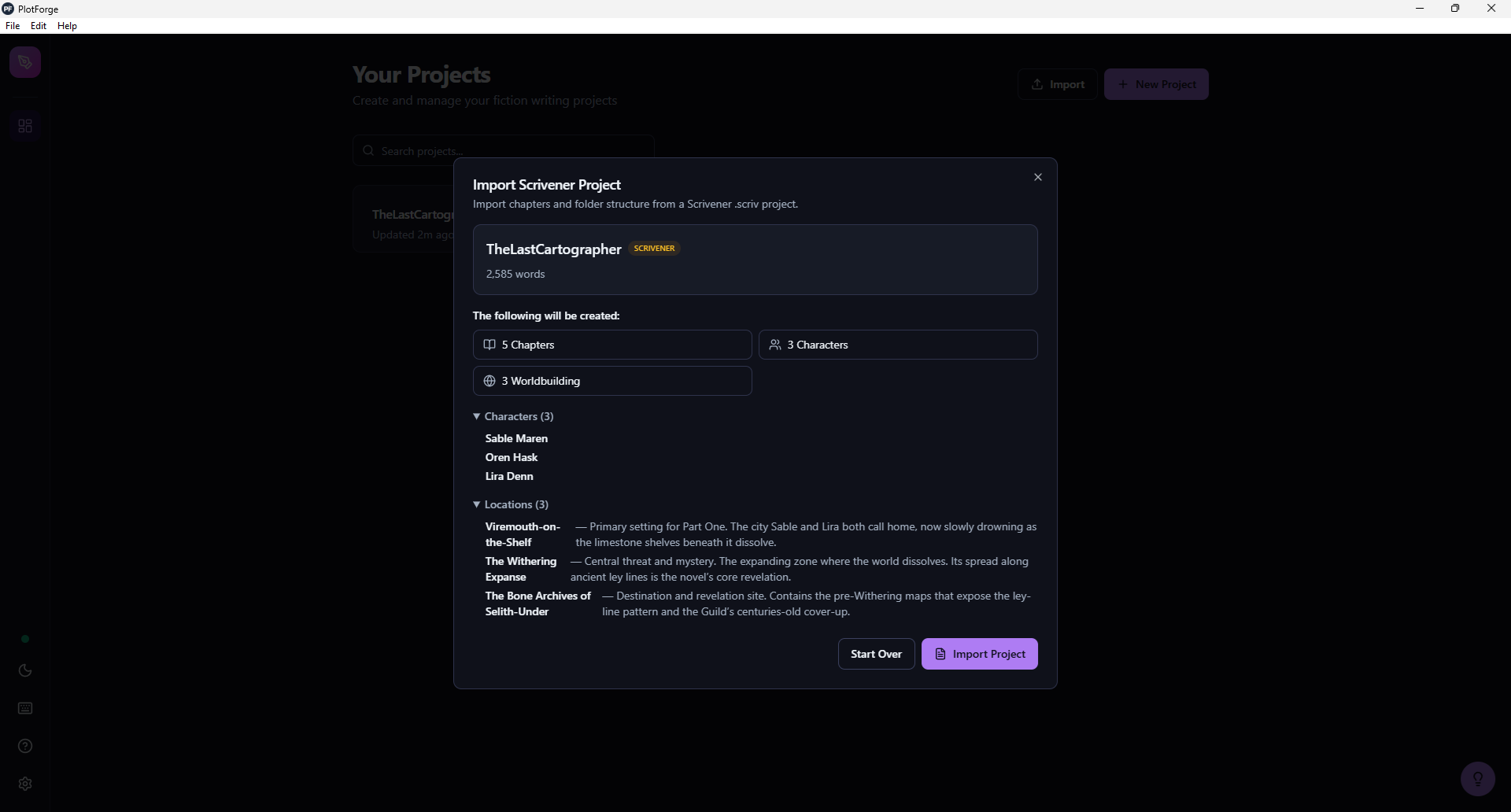
PlotForge also imports manuscripts from DOCX, Markdown, and plain text files (with AI-assisted extraction of characters and story structure), and can restore full project backups from JSON exports.
$79. One Time. No Subscription.
Writing is not a productivity SaaS. Writers do not produce content on a predictable monthly cadence that justifies a recurring fee. Some months you write 30,000 words. Some months you write nothing. Life happens. Day jobs happen. Kids happen.
Subscription pricing punishes writers who take breaks. It creates guilt about not using the tool enough to justify the cost. And it means the tool disappears the moment you stop paying.
PlotForge Desktop is $79, once. You buy it, you keep it. Updates are included. The AI runs on your own hardware through free, open-source runtimes, so there are no ongoing costs there either. Your total cost of ownership is $79, now and forever.
Who PlotForge Desktop Is For
Not every writer needs a desktop app with local AI. If you are happy writing in Google Docs with ChatGPT open in another tab, that workflow is perfectly valid.
PlotForge Desktop is built for writers who want three things:
- Privacy: Your writing, your characters, your world, your AI conversations never leave your machine. For writers working on sensitive material, unpublished manuscripts, or anything they simply want to keep private, this is non-negotiable.
- Independence: No internet required. No account required. No dependency on a service that might change its terms, raise its prices, or shut down. Your writing environment works regardless of what happens to any company, including ours.
- Depth: A dedicated workspace that understands the structure of long-form fiction, not a text editor with a sidebar. Characters, worldbuilding, outlines, consistency checking, emotional arcs, and a draft editor that ties it all together.
If those priorities match yours, try it. There is a free trial with no credit card required. If they do not, the web app is still here and still free to start. And if you are weighing this against Scrivener specifically, our guide to what to look for in a Scrivener alternative and our NovelCrafter cost breakdown cover the two most common comparisons we get asked about.
Your stories. Your machine. Your rules.
PlotForge Desktop is available now for Windows, macOS, and Linux.