Scene Surgery: Edit with Surgical Precision
AI-powered book editing that works on full chapters or specific text selections. Highlight a single sentence, paragraph, or dialogue exchange—get targeted improvements that preserve your unique voice.

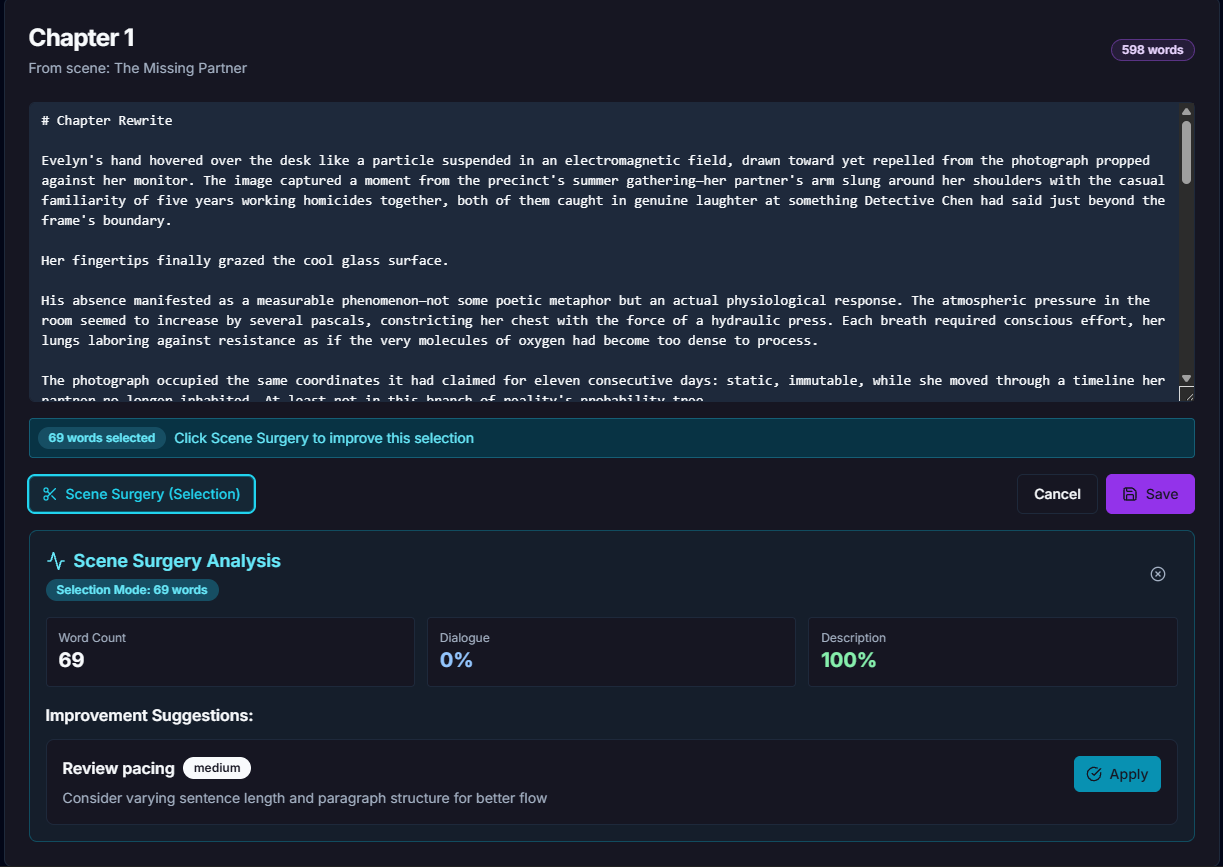
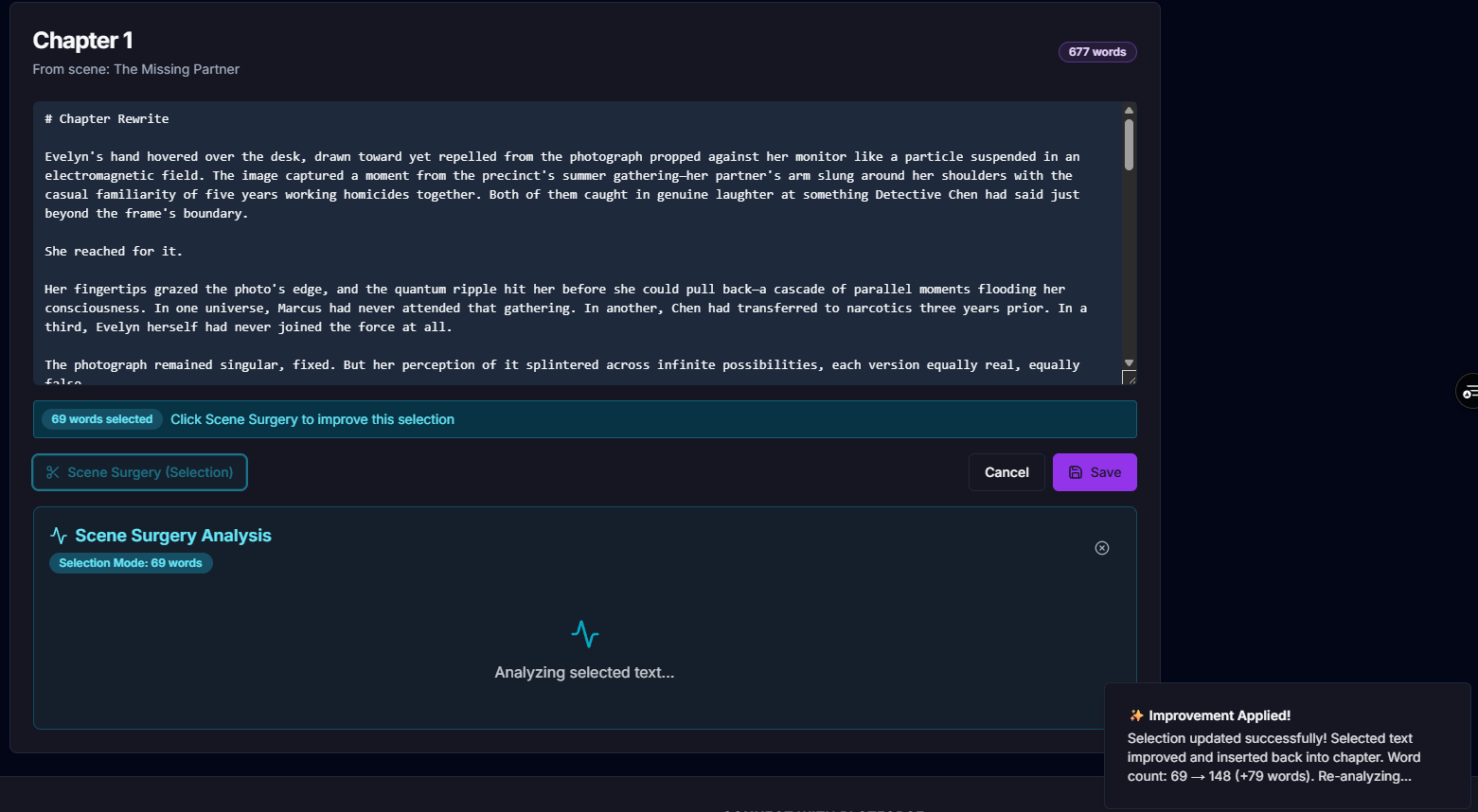
Scene Surgery in action: Highlight any text, get AI-powered suggestions, and apply improvements with one click
Fix specific sentences without rewriting entire paragraphs—save word count and preserve your voice
The Problem with Generic AI Editors
Most AI tools rewrite entire chapters. You can't fix just one clunky sentence without regenerating everything.
Generic AI editors strip away your unique style, replacing it with bland, corporate prose.
Processing entire chapters when you only need to fix one paragraph burns through your monthly AI budget.
Two Powerful Editing Modes
Scene Surgery adapts to your editing needs—comprehensive chapter analysis or precision line-level improvements.
Full Chapter Mode
Analyze entire chapters with comprehensive AI suggestions for structure, pacing, and flow.
- Complete scene metrics (word count, dialogue %, pacing)
- 3-4 actionable improvement suggestions
- Identifies pacing issues and structural problems
- Perfect for first-pass revisions
Selection Mode (NEW!)
Highlight specific text (sentences, paragraphs, dialogue) for precision AI improvements.
- Line-level precision: fix one sentence at a time
- Visual indicators show selected word count
- Only processes the text you highlight
- Perfect for polishing specific moments
See Scene Surgery in Action
Watch how Selection Mode transforms specific passages with surgical precision—no wholesale rewrites.

What Scene Surgery Can Improve
Targeted AI analysis for the elements that matter most in fiction.
Pacing & Flow
Smooth transitions, better rhythm, eliminate dead air. Keep readers turning pages.
Dialogue Naturalness
More authentic conversations, consistent character voices, eliminate on-the-nose dialogue.
Emotional Impact
Deepen character emotions, strengthen reader engagement, show-don't-tell improvements.
Sensory Details
Rich descriptions, immersive settings, vivid imagery that brings scenes to life.
Scene Structure
Clear beats, better organization, stronger openings and closings for every scene.
Prose Tightening
Cut redundancy, eliminate purple prose, sharpen every sentence without losing meaning.
How Scene Surgery Works
Simple, intuitive workflow that puts you in control.
Full Chapter Workflow
- 1
Navigate to the Draft tab and find your chapter
- 2
Click "Scene Surgery" button
- 3
AI analyzes structure, pacing, and content
- 4
Review 3-4 improvement suggestions with metrics
- 5
Click "Apply" on any suggestion
- 6
Review improved chapter and save
Selection Mode Workflow
- 1
Click "Edit" on a chapter to enter edit mode
- 2
Highlight specific text (sentence, paragraph, dialogue)
- 3
Cyan banner shows word count: "X words selected"
- 4
Click "Scene Surgery (Selection)" button
- 5
AI analyzes only your selected text
- 6
Apply targeted improvements and save
Perfect For These Editing Scenarios
Dialogue Polish
Highlight a conversation between characters and improve naturalness without rewriting the entire scene.
"Make this exchange feel more authentic"
Description Enhancement
Select a sparse paragraph and add sensory details, vivid imagery, and immersive atmosphere.
"Add more visual and sensory details"
Pacing Tightening
Highlight a slow section and improve flow, eliminate redundancy, and sharpen the rhythm.
"Tighten this without losing meaning"
Emotional Deepening
Select a character moment and strengthen emotional impact, internal conflict, and reader engagement.
"Make this moment hit harder"
Opening Hook
Highlight your first paragraph and make it more compelling, intriguing, and impossible to put down.
"Strengthen the opening hook"
Scene Transitions
Select awkward transitions between scenes or paragraphs and smooth the flow for better readability.
"Improve this transition"
Why Authors Love Scene Surgery
For Revision-Stage Authors
- Fix specific problems without rewriting entire chapters
- Polish dialogue, descriptions, and pacing individually
- Save time on line-level edits before submission
- Preserve your unique voice while improving craft
For Self-Editing Authors
- Get objective feedback on specific passages
- Learn craft techniques by comparing before/after
- Identify weak spots in pacing and structure
- Save money on professional editing costs
Scene Surgery vs. Generic AI Editors
| Feature | Scene Surgery | Generic AI Editors |
|---|---|---|
| Selective Text Editing | ✗ | |
| Full Chapter Analysis | ||
| Line-Level Precision | ✗ | |
| Voice Preservation | ✗ | |
| Scene Metrics (dialogue %, pacing) | ✗ | |
| Fiction-Specific Suggestions | ✗ | |
| Word Count Efficiency | ✗ | |
| Visual Selection Indicators | ✗ |
Frequently Asked Questions
Does Scene Surgery rewrite my entire chapter?
No! That's the whole point. In Selection Mode, you highlight only the text you want to improve (a sentence, paragraph, or dialogue). Scene Surgery analyzes and improves just that selection. In Full Chapter Mode, you get suggestions but choose which to apply.
Will Scene Surgery change my writing voice?
Scene Surgery is designed to preserve your unique voice. It enhances specific elements (pacing, dialogue, emotion) without flattening your style. You review all suggestions before applying them, so you stay in complete control.
How is this different from ChatGPT or Claude?
Generic AI chatbots give you wholesale rewrites. Scene Surgery is built specifically for fiction editing with context awareness, scene metrics, and selective text processing. It understands story structure, character voice, and pacing—not just grammar.
Does it work with manually written chapters?
Absolutely! Scene Surgery works on any text—whether you wrote it by hand, imported an existing manuscript, or generated it with AI. It's a revision tool, not just for AI-generated content.
How much does it cost?
Scene Surgery is included in all PlotForge plans. Free tier includes 8,000 words/month, Starter is $12/month (50k words), Pro is $24/month (200k words). Selection Mode saves word count by only processing what you highlight.
Can I use it for non-fiction or academic writing?
Scene Surgery is optimized for fiction (novels, short stories, screenplays). For non-fiction, you might find better results with general-purpose AI editors. Our tool focuses on narrative craft: dialogue, pacing, emotional impact, and story structure.
Ready to Edit with Surgical Precision?
Try Scene Surgery free. No credit card required. See how line-level AI editing transforms your manuscript without flattening your voice.
8,000 words free every month • No credit card required • Cancel anytime